Practice management integration
Practice management integration (an MVP)
Section titled “Practice management integration (an MVP)”This guide explains how an MVP integration with a practice management solution might look like.
Overview
Section titled “Overview”This guide outlines the recommended MVP (Minimum Viable Product) integration between practice management systems and Xama’s AML platform. The integration provides effective AML oversight while avoiding unnecessary complexity and maintenance overhead.
Integration Philosophy
Section titled “Integration Philosophy”The MVP integration follows these key principles:
- Authentication via OAuth2 - Users link their Xama account by recording OAuth2 credentials in your application
- Client-level linking only - Link clients between systems, exclude contact-level linking to avoid complexity
- Detailed work in Xama - Users perform all detailed AML work within Xama
- Status overview in your app - Display AML progress and risk assessment status within your application
- Risk assessment as primary control - Focus on the client risk assessment as the key compliance indicator
This approach provides good oversight without creating a deep integration requiring constant maintenance as AML regulations evolve.
Prerequisites
Section titled “Prerequisites”Before starting the integration, ensure you have:
- Completed the Authentication guide and obtained your OAuth2 credentials
- A Xama account created at https://platform.xamatech.com
- Your Client ID from the Xama platform
- Familiarity with the Xama training materials (available in the platform’s training center)
Integration Workflow
Section titled “Integration Workflow”1. Authentication Setup
Section titled “1. Authentication Setup”Users must first connect your application to their Xama account.
In your application:
- Provide a settings page for AML/Xama integration
- Request the user’s Xama OAuth2 credentials (Application ID and Secret)
- Store these credentials securely in your application
- Obtain and manage access tokens as described in the authentication guide
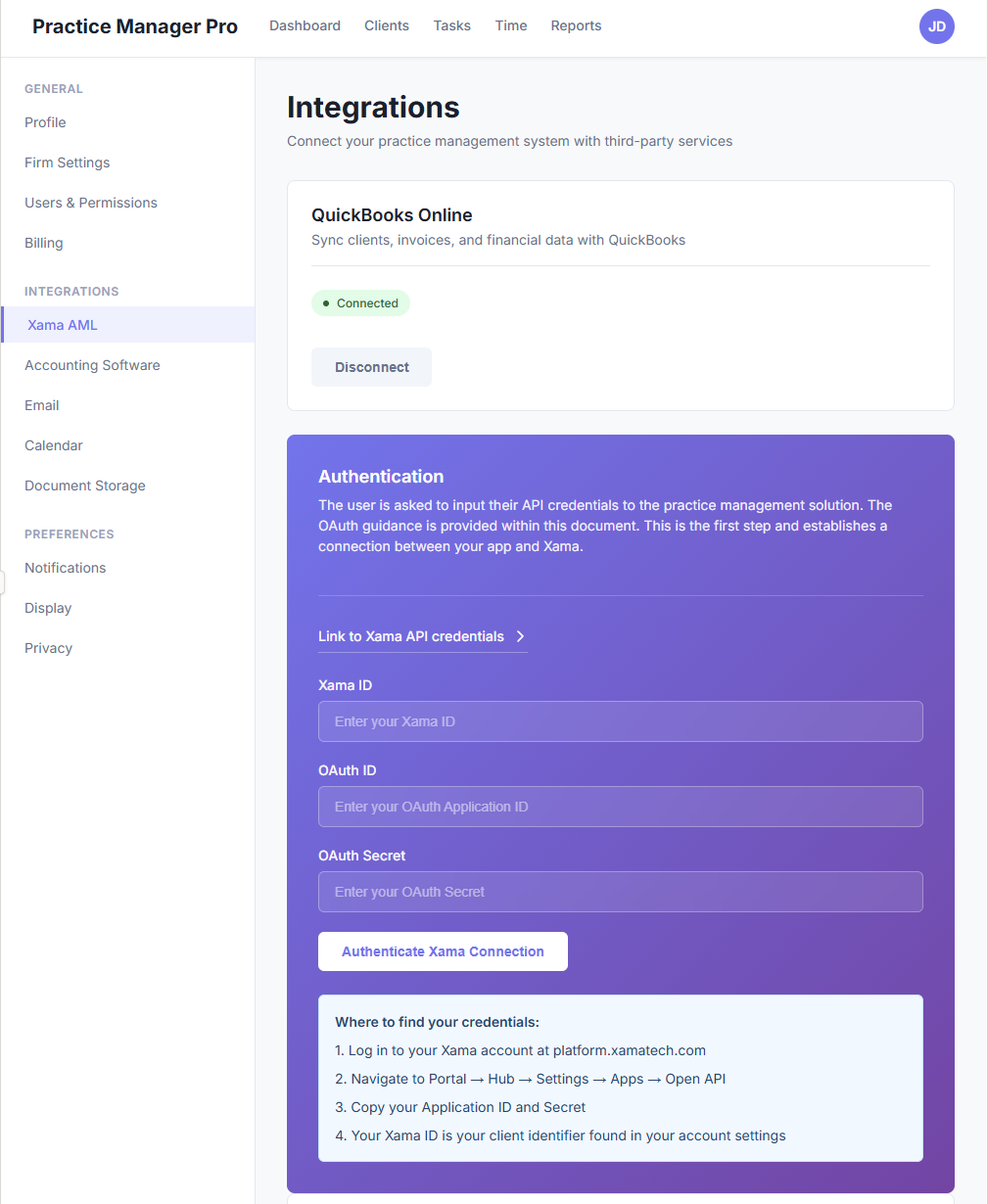
Example authentication screen
2. Client Record AML View
Section titled “2. Client Record AML View”Within each client record in your application, create an AML section or tab where users can:
- Link to an existing Xama client
- Create a new Xama client
- View risk assessment status
- Navigate directly to the Xama platform for detailed work
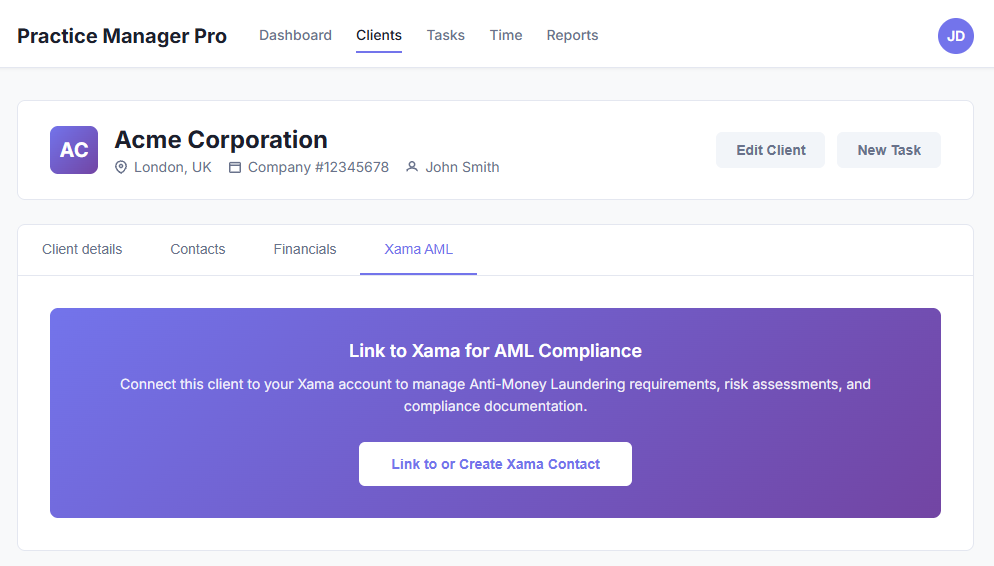
Prompt the user to link a client to Xama
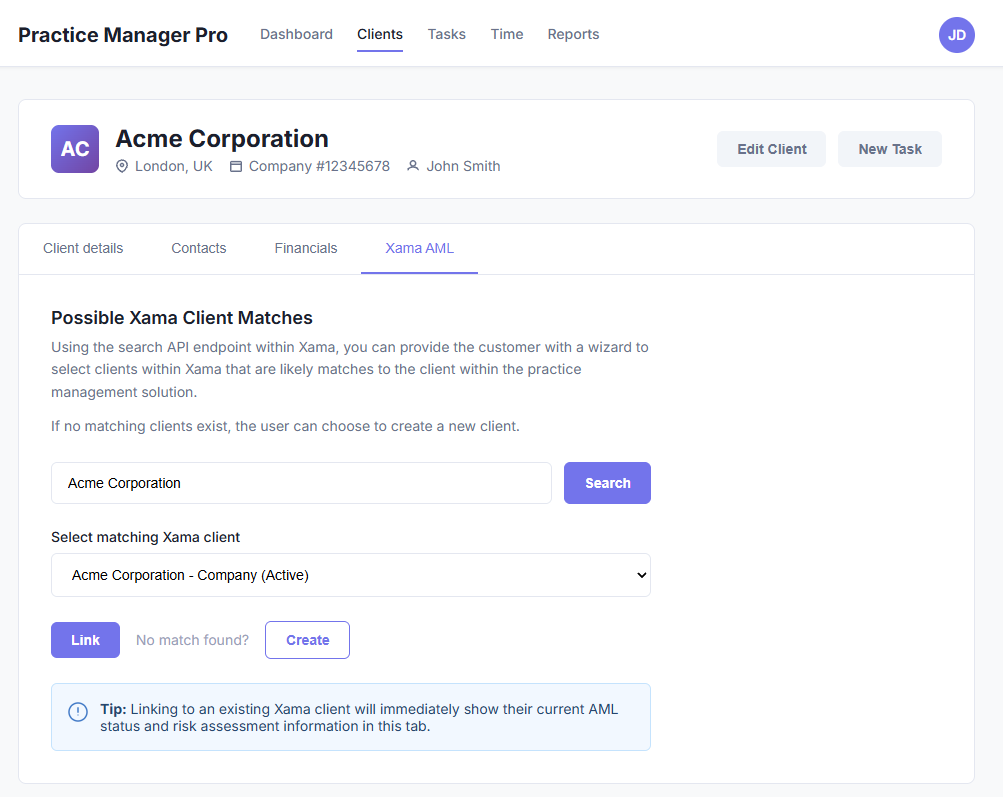
Example Xama AML tab on client record
API Endpoints and Implementation
Section titled “API Endpoints and Implementation”Client Search
Section titled “Client Search”Use the search endpoint to help users find and link existing Xama clients.
Endpoint
GET /clients/{clientId}/searchRequest Example
curl -X GET "https://xamahub.xamatech.com/api/clients/{clientId}/search?query=Cooper" \ -H "Accept: application/json" \ -H "Authorization: Bearer {access_token}"Query Parameter
| Parameter | Type | Description |
|---|---|---|
query | string | Search term (email, first name, last name, or client name) |
Response Example
{ "items": [ { "account_id": "c0faff70-785a-11f0-a2c1-8f30eeaee00b", "account_name": "Coopers Corp", "account_status": "ACTIVE", "account_type": "COMPANY", "email": "jacques@xamatech.com", "entity": "CONTACT", "id": "c0faff71-785a-11f0-a2c1-8f30eeaee00b", "name": "Yvette Cooper", "replica_mode": "REPLICA", "status": "ACTIVE", "type": "PRIMARY" }, { "entity": "XAMA_HUB_ACCOUNT", "id": "3e3fe850-4765-11f0-bfb7-6bd68cd9e41f", "name": "Yvette Cooper", "status": "ACTIVE", "type": "INDIVIDUAL" } ], "page": 1, "page_size": 100, "result_size": 2}Implementation Notes:
- Filter results to show only
XAMA_HUB_ACCOUNTentities (these represent clients) - Ignore
CONTACTentities in search results - Present matching accounts in a selection wizard for the user
- Store the selected
idas the link between your client and the Xama client
Create Client and Primary Contact
Section titled “Create Client and Primary Contact”If no matching client exists in Xama, allow users to create a new one.
Endpoint
POST /clients/{clientId}/accountsRequest Example
curl -X POST "https://xamahub.xamatech.com/api/clients/{clientId}/accounts" \ -H "Content-Type: application/json" \ -H "Authorization: Bearer {access_token}" \ -d '{ "name": "Acme Corporation", "type": "COMPANY", "reg_number": "01234567", "metadata": { "external_reference": "PM-12345" }, "primary_contact": { "first_name": "John", "middle_name": "", "last_name": "Smith", "email": "john.smith@acme.com", "phone": "+44 20 1234 5678", "date_of_birth": "1980-05-15", "driving_license_expiry_date": "", "driving_license_number": "", "passport_number": "", "passport_expiry_date": "", "primary_address": { "street": "123 High Street", "postcode": "SW1A 1AA", "city": "London", "country_code": "GB", "type": "PRIMARY" } } }'Request Parameters
| Field | Type | Required | Description |
|---|---|---|---|
name | string | Yes | Client/company name |
type | string | Yes | COMPANY or INDIVIDUAL |
reg_number | string | No | Company registration number |
metadata.external_reference | string | No | Your system’s client ID (recommended for mapping) |
primary_contact | object | Yes | Primary contact details |
Primary Contact Fields
| Field | Type | Required | Description |
|---|---|---|---|
first_name | string | Yes | Contact’s first name |
last_name | string | Yes | Contact’s last name |
email | string | Yes | Contact’s email address |
date_of_birth | string | No | Format: YYYY-MM-DD |
phone | string | No | Contact phone number |
primary_address | object | No | Primary residential address |
Implementation Notes:
- Use
metadata.external_referenceto store your system’s client ID for easy cross-referencing - Store the returned
idfrom the response as the link to the Xama client - Only the primary contact is typically synced during initial creation
- Additional contacts can be added later if needed for beneficial ownership
Create Additional Contacts (Optional)
Section titled “Create Additional Contacts (Optional)”Add additional contacts to a Xama client account when needed for beneficial ownership purposes.
Endpoint
POST /clients/{clientId}/accounts/{accountId}/contactsRequest Example
curl -X POST "https://xamahub.xamatech.com/api/clients/{clientId}/accounts/{accountId}/contacts" \ -H "Content-Type: application/json" \ -H "Authorization: Bearer {access_token}" \ -d '{ "first_name": "Jane", "middle_name": "", "last_name": "Doe", "email": "jane.doe@example.com", "phone": "+44 20 9876 5432", "primary_address": { "street": "456 Oxford Street", "postcode": "W1D 1BS", "city": "London", "country_code": "GB", "type": "PRIMARY" } }'Important: Most integrations do not need to sync additional contacts automatically. In many cases, only syncing the primary contact during initial client creation is sufficient. Determining beneficial ownership should be completed as part of the AML process within Xama.
Understanding Xama’s Data Model
Section titled “Understanding Xama’s Data Model”Xama manages clients and contacts differently than typical CRM or practice management systems:
Why Contact Linking is Excluded
Section titled “Why Contact Linking is Excluded”- Different data purposes - Xama stores residential addresses and identity verification data, while PM systems store operational contact details
- Data divergence - AML and operational data naturally diverge over time
- Data sensitivity - AML information is highly sensitive; keeping it separate improves GDPR compliance and access control
- AML workflow requirements - Beneficial ownership determination should occur during the AML process, not be pre-populated from operational systems
Recommended Approach
Section titled “Recommended Approach”- Create or link the client entity only
- Sync the primary contact during initial creation
- Allow users to add additional contacts within Xama as part of the AML workflow
- Do not maintain ongoing contact synchronisation
Displaying Risk Assessment Status
Section titled “Displaying Risk Assessment Status”Once a client is linked, display risk assessment information in your application’s AML section.
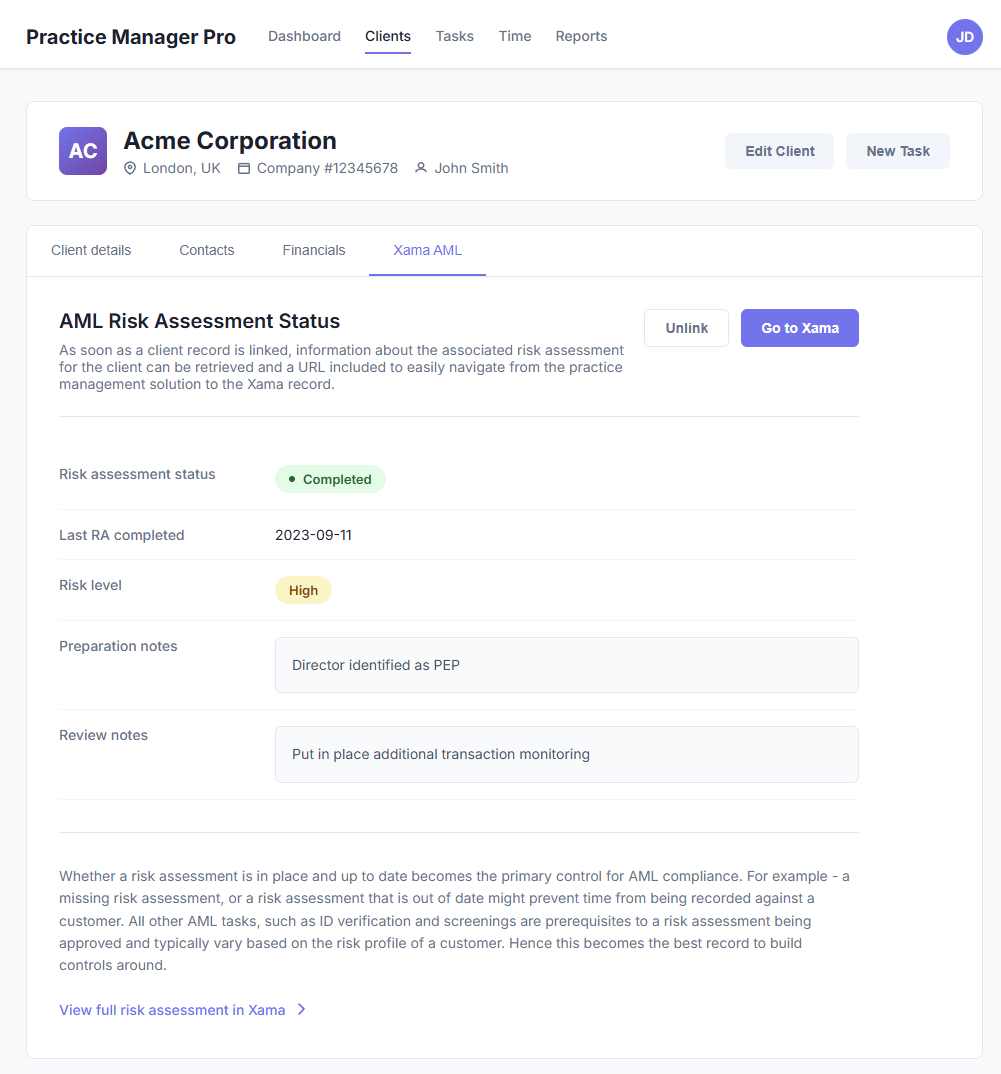
Retrieve Risk Assessments
Section titled “Retrieve Risk Assessments”Endpoint
GET /clients/{clientId}/accounts/{accountId}/risk-assessmentsRequest Example
curl -X GET "https://xamahub.xamatech.com/api/clients/{clientId}/accounts/{accountId}/risk-assessments" \ -H "Accept: application/json" \ -H "Authorization: Bearer {access_token}"Response Example
{ "items": [ { "completed_at": "2025-11-28", "created_at": "2025-11-11T10:29:26.043Z", "id": "4c004970-bee9-11f0-bd00-3d412f3419a1", "notes": "These are assessment notes", "prepared_by": "Jacques", "review_notes": "These are review notes", "reviewed_by": "David", "risk_level": "NORMAL", "status": "IN_PROGRESS", "updated_at": "2025-11-11T10:29:50.496Z" }, { "completed_at": "2025-11-11", "created_at": "2025-11-11T10:26:13.597Z", "id": "d94e1ab0-bee8-11f0-84be-f7ee26e54ed8", "risk_level": "HIGH", "status": "COMPLETED", "updated_at": "2025-11-11T10:27:25.230Z" }, { "completed_at": "2025-06-12", "created_at": "2025-06-12T08:00:03.836Z", "id": "3f4694d0-4763-11f0-9b61-1dab7768cf6e", "risk_level": "HIGH", "status": "COMPLETED", "updated_at": "2025-09-15T16:40:06.611Z" } ], "page": 1, "page_size": 100, "result_size": 3}Response Fields
| Field | Type | Description |
|---|---|---|
id | string | Unique risk assessment identifier |
status | string | IN_PROGRESS, IN_REVIEW, or COMPLETED |
risk_level | string | LOW, NORMAL, HIGH, or VERY_HIGH |
completed_at | string | Date assessment was completed (YYYY-MM-DD) |
prepared_by | string | Name of preparer |
reviewed_by | string | Name of reviewer |
notes | string | Assessment notes |
review_notes | string | Review notes |
Identifying the Current Risk Assessment
Section titled “Identifying the Current Risk Assessment”Critical: Only risk assessments with status: "COMPLETED" represent approved assessments.
To find the current risk assessment:
- Filter for assessments with
status: "COMPLETED" - Sort by
completed_atdate (descending) - The most recent completed assessment is the current one
Example Logic:
const completedAssessments = assessments.items.filter(a => a.status === "COMPLETED");const currentAssessment = completedAssessments.sort((a, b) => new Date(b.completed_at) - new Date(a.completed_at))[0];Risk Assessment as a Control Point
Section titled “Risk Assessment as a Control Point”The risk assessment status is the primary control for AML compliance. Consider using it to:
- Prevent time recording against clients with missing or outdated assessments
- Display warnings when assessments are approaching review dates
- Block certain operations until AML compliance is confirmed
- Generate compliance reports based on assessment status
All other AML tasks (ID verification, screenings) are prerequisites to risk assessment approval and vary based on client risk profile, making the risk assessment the ideal control point.
Deep Link to Xama
Section titled “Deep Link to Xama”Provide direct navigation to the Xama client record:
https://platform.xamatech.com/portal/hub/clients/{accountId}This allows users to seamlessly transition from your application to Xama for detailed AML work.
Webhooks for Real-Time Updates
Section titled “Webhooks for Real-Time Updates”Instead of polling for changes, use webhooks to receive real-time notifications when risk assessments are updated.
Create a Webhook Subscription
Section titled “Create a Webhook Subscription”Endpoint
POST /clients/{clientId}/subscriptionsRequest Example
curl -X POST "https://xamahub.xamatech.com/api/clients/{clientId}/subscriptions" \ -H "Content-Type: application/json" \ -H "Authorization: Bearer {access_token}" \ -d '{ "callback_url": "https://your-app.com/webhooks/xama", "type": "WEBHOOK", "config": { "api_secret": "your-webhook-secret", "entities": [ { "entity": "ACCOUNT", "events": [ "RISK_ASSESSMENT_CREATED", "RISK_ASSESSMENT_IN_REVIEW", "RISK_ASSESSMENT_COMPLETED", "RISK_ASSESSMENT_DELETED" ] } ] } }'Configuration Parameters
| Field | Type | Description |
|---|---|---|
callback_url | string | Your webhook endpoint URL |
type | string | Must be WEBHOOK |
api_secret | string | Secret for webhook signature verification |
entities | array | List of entity types and events to monitor |
Webhook Events for Risk Assessments:
RISK_ASSESSMENT_CREATED- New risk assessment startedRISK_ASSESSMENT_IN_REVIEW- Assessment submitted for reviewRISK_ASSESSMENT_COMPLETED- Assessment approved and finalizedRISK_ASSESSMENT_DELETED- Assessment removed
Implementation Notes:
- Verify webhook signatures using the
api_secretyou provided - Update your local cache/database when receiving webhook notifications
- Handle webhook retries gracefully (implement idempotency)
- Respond with 2xx status code to acknowledge receipt