ID verification flow integration
ID verification flow integration
Section titled “ID verification flow integration”An example of how ID collection and verification can be integrated into your onboarding workflow.
Overview
Section titled “Overview”This guide describes how to integrate Xama’s client onboarding, identity verification, and AML screening capabilities into your application. The integration streamlines the collection of ID documentation, identity verification, and compliance checks as part of your customer onboarding workflow.
Integration Capabilities
Section titled “Integration Capabilities”This integration enables you to:
- Create clients and contacts in Xama programmatically
- Trigger onboarding requests to collect ID documents and personal information
- Embed verification links in your own onboarding portal or send via email
- Receive real-time notifications when verification is complete via webhooks
- Analyze verification results including document checks and face matching
- Copy verified data back to contact records
- Initiate AML checks for identity verification and PEP/Sanctions screening
- Review screening results and make compliance decisions
Prerequisites
Section titled “Prerequisites”Before starting the integration, ensure you have:
- Completed the Authentication guide and obtained your OAuth2 credentials
- A Xama account created at https://platform.xamatech.com
- Your Client ID from the Xama platform
- Email connection configured in Xama (if sending onboarding emails): https://platform.xamatech.com/portal/hub/settings/email-settings
- Familiarity with the Xama training materials (available in the platform’s training center)
Understanding Xama Terminology
Section titled “Understanding Xama Terminology”Before working with the API, it’s important to understand how Xama uses certain terms:
| Xama UI Term | API Term | Description |
|---|---|---|
| Client | Account | A client record as shown in the Xama interface (company, individual, trust, etc.) |
| N/A | Client | Your Xama customer account - used as {clientId} in all API calls |
| Contact | Contact | An individual person associated with an account |
Integration Workflow
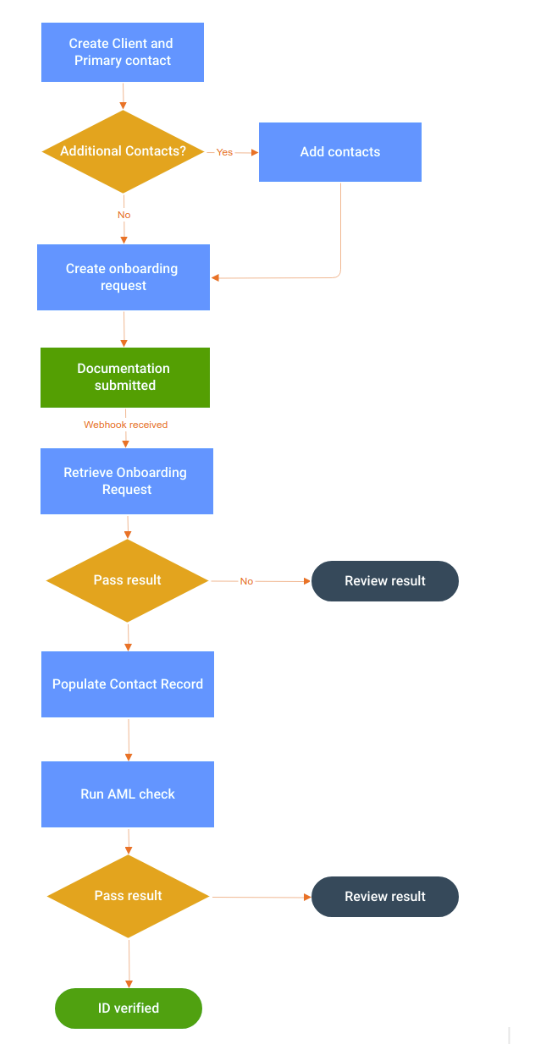
Section titled “Integration Workflow”The typical onboarding flow follows this sequence:
- Create client and contacts in Xama
- Trigger onboarding request to collect documents
- Contact completes verification via email link or embedded portal
- Receive webhook notification when verification is complete
- Analyze results and check document/face match decisions
- Copy verified data to contact record
- Trigger AML check for identity verification and screening
- Review screening results for PEP/Sanctions matches
- Complete compliance workflow based on results
Workflow Diagram
Section titled “Workflow Diagram”The verification journey follows this high-level flow:
API Endpoints and Implementation
Section titled “API Endpoints and Implementation”Create Client and Contacts
Section titled “Create Client and Contacts”Before triggering onboarding requests, you must create the client (account) and associated contacts in Xama.
Create Client with Primary Contact
Section titled “Create Client with Primary Contact”Endpoint
POST /clients/{clientId}/accountsRequest Example
curl -X POST "https://xamahub.xamatech.com/api/clients/{clientId}/accounts" \ -H "Content-Type: application/json" \ -H "Authorization: Bearer {access_token}" \ -d '{ "name": "Acme Corporation", "type": "COMPANY", "reg_number": "12345678", "primary_contact": { "first_name": "John", "middle_name": "Robert", "last_name": "Smith", "email": "john.smith@acme.com", "phone": "+44 20 1234 5678", "date_of_birth": "1985-03-15", "driving_license_number": "SMITH123456JR9AB", "driving_license_expiry_date": "2030-03-15", "passport_number": "123456789<<<<01", "passport_expiry_date": "2029-06-20", "primary_address": { "street": "123 High Street", "postcode": "SW1A 1AA", "city": "London", "country_code": "GB", "type": "PRIMARY" } } }'Account Type Parameter
| Value | Use Case | Description |
|---|---|---|
INDIVIDUAL | B2C relationships | Single-person entities (e.g., personal tax returns, sole traders) |
COMPANY | B2B relationships | Multi-contact entities (companies, partnerships, trusts, charities) |
Request Parameters
| Field | Type | Required | Description |
|---|---|---|---|
name | string | Yes | Client/company name |
type | string | Yes | COMPANY or INDIVIDUAL |
reg_number | string | No | Company registration number |
primary_contact | object | Yes | Primary contact details |
Primary Contact Fields
| Field | Type | Required | Description |
|---|---|---|---|
first_name | string | Yes | Contact’s first name |
middle_name | string | No | Contact’s middle name |
last_name | string | Yes | Contact’s last name |
email | string | Yes | Contact’s email (required for onboarding emails) |
phone | string | No | Contact phone number |
date_of_birth | string | No | Format: YYYY-MM-DD |
driving_license_number | string | No | Driving license number |
driving_license_expiry_date | string | No | Format: YYYY-MM-DD |
passport_number | string | No | Passport number |
passport_expiry_date | string | No | Format: YYYY-MM-DD |
primary_address | object | No | Primary residential address |
Create Additional Contacts
Section titled “Create Additional Contacts”Add additional contacts (beneficial owners, directors, etc.) to an account.
Endpoint
POST /clients/{clientId}/accounts/{accountId}/contactsRequest Example
curl -X POST "https://xamahub.xamatech.com/api/clients/{clientId}/accounts/{accountId}/contacts" \ -H "Content-Type: application/json" \ -H "Authorization: Bearer {access_token}" \ -d '{ "first_name": "Jane", "middle_name": "Marie", "last_name": "Doe", "email": "jane.doe@example.com", "phone": "+44 20 9876 5432", "primary_address": { "street": "456 Oxford Street", "postcode": "W1D 1BS", "city": "London", "country_code": "GB", "type": "PRIMARY" } }'Reference: See the Contacts API documentation for complete specifications.
Trigger Onboarding Request
Section titled “Trigger Onboarding Request”Onboarding requests collect ID documents, selfies, personal details, and proof of address from contacts.
Prerequisites for Onboarding Requests
Section titled “Prerequisites for Onboarding Requests”- Email connection configured (if sending emails): Configure at https://platform.xamatech.com/portal/hub/settings/email-settings
- Contact must have email address (even if suppressing emails, use a placeholder/internal email)
Endpoint
PUT /clients/{clientId}/accounts/{accountId}/contacts/{contactId}/reports/onboardingRequest Example
curl -X PUT "https://xamahub.xamatech.com/api/clients/{clientId}/accounts/{accountId}/contacts/{contactId}/reports/onboarding" \ -H "Content-Type: application/json" \ -H "Authorization: Bearer {access_token}" \ -d '{ "config": { "parameters": { "suppress_invitation_mail": "false", "frontend_redirect_url": "https://yourapp.com/onboarding/complete", "idscan": "true", "personal_details": "true", "proof_of_identity": "true", "selfie": "false", "face_match": "false", "proof_of_address": "true" }, "ttl_in_days": 365, "is_automatic_refresh_enabled": false } }'Configuration Parameters
| Parameter | Type | Description |
|---|---|---|
suppress_invitation_mail | boolean | false = Send email; true = Don’t send email (retrieve link manually) |
frontend_redirect_url | string | URL to redirect user after completion (optional) |
personal_details | boolean | Request home address from user |
idscan | boolean | Request ID document (passport/license) - use when face_match is false |
face_match | boolean | Request ID document + selfie + perform biometric verification |
face_match_mobile | boolean | Request ID document + selfie + perform biometric verification over Xama Verify app |
unique_email | boolean | Collect preferred email address |
legal_names_history | boolean | Collect legal names history |
home_address_history | boolean | Collect address history of 12 months |
selfie | boolean | Request selfie without biometric check (use when face_match is false) - not recommended |
proof_of_identity | boolean | Request additional proof of identity document |
proof_of_address | boolean | Request proof of address document |
ttl_in_days | number | How long the verification remains valid (e.g., 365) |
is_automatic_refresh_enabled | boolean | Automatically refresh verification before expiry - not recommended |
Configuration Guidelines:
- Standard ID verification:
idscan: true,face_match: false,selfie: false - Biometric verification:
face_match: true,idscan: false,selfie: false - Biometric verification (NFC enabled):
face_match_mobile: true,idscan: false,selfie: false
Suppressing Emails and Embedding Links
Section titled “Suppressing Emails and Embedding Links”You have two options for delivering the onboarding link to contacts:
Option 1: Email Sent by Xama (Default)
Section titled “Option 1: Email Sent by Xama (Default)”Set suppress_invitation_mail: "false" and Xama will email the link to the contact’s email address.
Option 2: Embed Link in Your Application
Section titled “Option 2: Embed Link in Your Application”Set suppress_invitation_mail: "true" and retrieve the link to embed in your customer portal, onboarding wizard, or other interface.
Retrieve the Onboarding Link:
Endpoint
GET /clients/{clientId}/accounts/{accountId}/contacts/{contactId}/reports/onboardingRequest Example
curl -X GET "https://xamahub.xamatech.com/api/clients/{clientId}/accounts/{accountId}/contacts/{contactId}/reports/onboarding" \ -H "Accept: application/json" \ -H "Authorization: Bearer {access_token}"Response Extract
{ "data": { "onboarding_url": "https://platform.xamatech.com/onboarding/complete/abc123..." }}Use the onboarding_url value to direct users to the verification flow from your application.
Frontend Redirect URL:
Set frontend_redirect_url to redirect users back to your application after they complete verification. Without this, users see a generic “Thank you” screen.
Example Use Cases:
https://yourapp.com/onboarding/success- Return to onboarding wizardhttps://yourapp.com/dashboard?verified=true- Return to dashboard with statushttps://yourapp.com/clients/{clientId}/complete- Return to client record
Setting Up Webhook Subscriptions
Section titled “Setting Up Webhook Subscriptions”Use webhooks to receive real-time notifications when contacts complete onboarding requests, eliminating the need for polling.
Endpoint
POST /clients/{clientId}/subscriptionsRequest Example
curl -X POST "https://xamahub.xamatech.com/api/clients/{clientId}/subscriptions" \ -H "Content-Type: application/json" \ -H "Authorization: Bearer {access_token}" \ -d '{ "callback_url": "https://yourapp.com/webhooks/xama/onboarding", "type": "WEBHOOK", "config": { "api_secret": "your-webhook-secret", "entities": [ { "entity": "CONTACT", "report_types": ["ONBOARDING"], "events": [ "REPORT_INITIATED", "REPORT_READY", "REPORT_ERROR", "REPORT_CREDIT_LIMIT_EXCEEDED", "REPORT_IN_REVIEW", "REPORT_REVIEW_COMPLETED" ] } ] } }'Configuration Parameters
| Field | Type | Description |
|---|---|---|
callback_url | string | Your webhook endpoint URL |
type | string | Must be WEBHOOK |
api_secret | string | Secret for webhook signature verification |
entities[].entity | string | CONTACT for onboarding reports |
entities[].report_types | array | ["ONBOARDING"] to monitor onboarding requests |
entities[].events | array | Events to monitor (see below) |
Webhook Events for Onboarding:
| Event | Description | Action |
|---|---|---|
REPORT_INITIATED | Onboarding request created | Optional: Update UI to show “pending” status |
REPORT_READY | Contact completed verification | Primary event: Retrieve and analyze results |
REPORT_ERROR | Error during verification | Handle error, potentially retry |
REPORT_CREDIT_LIMIT_EXCEEDED | Account credit limit reached | Contact Xama support |
REPORT_IN_REVIEW | Manual review required | Optional: Notify admin team |
REPORT_REVIEW_COMPLETED | Manual review finished | Retrieve updated results |
Implementation Notes:
- Focus on
REPORT_READYfor completed verifications - Verify webhook signatures using your
api_secret - Respond with 2xx status code to acknowledge receipt
- Implement idempotency to handle duplicate webhooks
Analyzing Onboarding Request Results
Section titled “Analyzing Onboarding Request Results”Once you receive a REPORT_READY webhook notification, retrieve the full onboarding report to analyze verification results.
Endpoint
GET /clients/{clientId}/accounts/{accountId}/contacts/{contactId}/reports/onboardingRequest Example
curl -X GET "https://xamahub.xamatech.com/api/clients/{clientId}/accounts/{accountId}/contacts/{contactId}/reports/onboarding" \ -H "Accept: application/json" \ -H "Authorization: Bearer {access_token}"Response Example
{ "account_id": "ae9a6650-48cb-11ef-b07f-21e051e087da", "client_id": "1b62c5a0-03a1-11ee-b515-618e61a59cb4", "config": { "parameters": { "face_match": "true", "proof_of_address": "true" }, "ttl_in_days": 365, "is_automatic_refresh_enabled": false }, "contact_id": "ae9a6651-48cb-11ef-b07f-21e051e087da", "data": { "idscan": { "date_of_birth": "1970-01-01", "document_type": "Passport", "passport_number": "564[..]<<<02", "document_decision": "PASSED", "document_last_name": "SMITH", "face_match_decision": "PASSED", "document_expiry_date": "2030-01-01", "document_given_names": "JOHN ROBERT", "document_decision_date": "2024-07-23T08:22:07.3078793", "driving_license_number": "56[..]63" }, "report_link": "https://platform.xamatech.com/...", "refreshed_at": "2024-07-23", "request_sent_at": "2024-07-23T08:19:08.290Z", "personal_details": { "city": "London", "street": "123 High Street", "country": "GB", "postcode": "SW1A 1AA" } }, "id": "ae9a6650-48cb-11ef-b07f-21e051e087da--ae9a6651-48cb-11ef-b07f-21e051e087da", "review": { "empty": false, "notes": "Verified", "status": "COMPLETE", "decision": "PASSED" }, "revision": "1721722746296", "status": "READY", "type": "ONBOARDING"}Key Response Fields
| Field Path | Description |
|---|---|
status | Overall status: READY when complete |
data.idscan.document_decision | PASSED, REFER, or ALERT |
data.idscan.face_match_decision | PASSED or FAILED (if face match enabled) |
data.idscan.document_type | Passport or Driving License |
data.idscan.document_decision_date | When document was verified |
data.idscan.date_of_birth | Extracted from ID document |
data.idscan.document_given_names | Given names from document |
data.idscan.document_last_name | Last name from document |
data.idscan.passport_number | If document type is Passport |
data.idscan.driving_license_number | If document type is Driving License |
data.idscan.document_expiry_date | Document expiration date |
data.personal_details | Address provided by contact |
review.decision | Manual review decision (if applicable) |
review.notes | Reviewer notes |
Decision Logic
Document Decision:
PASSED- Document verified successfully, data can be trustedREFER- Requires manual review, often due to OCR extraction failuresALERT- Serious issue (rare: underage, deceased, etc.)
Face Match Decision (if enabled):
PASSED- Biometric match between ID photo and selfie successfulFAILED- Biometric match failed
Critical Implementation Notes:
- **Only accept extracted data if **
document_decision: "PASSED"-REFERdecisions may indicate OCR extraction errors, so data may be incorrect - Check document type before using ID numbers - Use
passport_numberonly ifdocument_type: "Passport", usedriving_license_numberonly ifdocument_type: "Driving License" - Handle REFER decisions - Implement manual review workflow or request re-submission
Copying Verified Data to Contact Record
Section titled “Copying Verified Data to Contact Record”After verifying onboarding results, update the contact record with the verified information.
Important: Xama’s PUT requests replace all contact data. You must include existing data you want to preserve along with new verified data.
Best Practice Workflow
Section titled “Best Practice Workflow”- Retrieve current contact data via GET request
- Merge verified data with existing contact data
- Update contact via PUT request with complete merged data
Retrieve Contact Record
Section titled “Retrieve Contact Record”Endpoint
GET /clients/{clientId}/accounts/{accountId}/contacts/{contactId}Request Example
curl -X GET "https://xamahub.xamatech.com/api/clients/{clientId}/accounts/{accountId}/contacts/{contactId}" \ -H "Accept: application/json" \ -H "Authorization: Bearer {access_token}"Update Contact Record
Section titled “Update Contact Record”Endpoint
PUT /clients/{clientId}/accounts/{accountId}/contacts/{contactId}Request Example
curl -X PUT "https://xamahub.xamatech.com/api/clients/{clientId}/accounts/{accountId}/contacts/{contactId}" \ -H "Content-Type: application/json" \ -H "Authorization: Bearer {access_token}" \ -d '{ "metadata": { "external_reference": "YOUR-CLIENT-ID-123" }, "first_name": "John", "middle_name": "Robert", "last_name": "Smith", "type": "PRIMARY", "email": "john.smith@acme.com", "phone": "+44 20 1234 5678", "date_of_birth": "1970-01-01", "driving_license_number": "", "driving_license_expiry_date": "", "passport_number": "564123456", "passport_expiry_date": "2030-01-01", "primary_address": { "street": "123 High Street", "postcode": "SW1A 1AA", "city": "London", "country_code": "GB" } }'Important Notes:
- Country codes: Use ISO-2 format (e.g.,
GBfor United Kingdom,USfor United States) - Blank fields: Set to empty string (
"") if not applicable, don’t omit - Data not included will be cleared: Always retrieve existing data first and include it in the update
- External reference: Use
metadata.external_referenceto link to your system’s client ID
Triggering AML Checks
Section titled “Triggering AML Checks”An AML check performs electronic identity verification and screens for Politically Exposed Persons (PEPs) and Sanctions matches.
Prerequisites:
- Contact must have sufficient data: full name, date of birth, and address
Endpoint
PUT /clients/{clientId}/accounts/{accountId}/contacts/{contactId}/reports/amlRequest Example
curl -X PUT "https://xamahub.xamatech.com/api/clients/{clientId}/accounts/{accountId}/contacts/{contactId}/reports/aml" \ -H "Content-Type: application/json" \ -H "Authorization: Bearer {access_token}" \ -d '{ "config": { "ttl_in_days": 365, "is_automatic_refresh_enabled": false } }'Configuration Parameters
| Parameter | Type | Description |
|---|---|---|
ttl_in_days | number | How long the AML check remains valid (e.g., 365) |
is_automatic_refresh_enabled | boolean | Automatically refresh before expiry |
Processing Notes:
- AML checks are asynchronous and take a few seconds to complete
- Use webhooks (recommended) or polling to check for completion
- Results include identity verification decision + PEP/Sanctions screening
Setting Up AML Check Webhooks
Section titled “Setting Up AML Check Webhooks”Monitor AML check completion with webhooks.
Endpoint
POST /clients/{clientId}/subscriptionsRequest Example
curl -X POST "https://xamahub.xamatech.com/api/clients/{clientId}/subscriptions" \ -H "Content-Type: application/json" \ -H "Authorization: Bearer {access_token}" \ -d '{ "callback_url": "https://yourapp.com/webhooks/xama/aml", "type": "WEBHOOK", "config": { "api_secret": "your-webhook-secret", "entities": [ { "entity": "CONTACT", "report_types": ["AML"], "events": [ "REPORT_INITIATED", "REPORT_READY", "REPORT_ERROR", "REPORT_CREDIT_LIMIT_EXCEEDED", "REPORT_IN_REVIEW", "REPORT_REVIEW_COMPLETED" ] } ] } }'Focus on the REPORT_READY event to know when AML checks are complete.
Analysing AML Check Results
Section titled “Analysing AML Check Results”Retrieve and analyze AML check results after receiving a REPORT_READY webhook.
Endpoint
GET /clients/{clientId}/accounts/{accountId}/contacts/{contactId}/reports/amlRequest Example
curl -X GET "https://xamahub.xamatech.com/api/clients/{clientId}/accounts/{accountId}/contacts/{contactId}/reports/aml" \ -H "Accept: application/json" \ -H "Authorization: Bearer {access_token}"Response Example
{ "account_id": "4552c460-91f2-11ef-96be-935da77d5118", "client_id": "1b62c5a0-03a1-11ee-b515-618e61a59cb4", "config": { "ttl_in_days": 365, "is_automatic_refresh_enabled": false }, "contact_id": "4552c461-91f2-11ef-96be-935da77d5118", "data": { "decision": "PASS", "pep_matches": "Potential Match", "report_link": "https://platform.xamatech.com/...", "refreshed_at": "2024-10-24", "sanctions_matches": "No Match", "last_decision_date": "2024-10-24" }, "id": "4552c460-91f2-11ef-96be-935da77d5118--4552c461-91f2-11ef-96be-935da77d5118", "review": { "empty": false, "notes": "Reviewed potential PEP match - determined to be false positive", "status": "COMPLETE", "decision": "PASS", "pep_matches": "MATCH_DISMISSED", "sanctions_matches": "NO_MATCH" }, "revision": "1729766007467", "status": "READY", "type": "AML"}Key Response Fields
| Field | Possible Values | Description |
|---|---|---|
status | READY, INITIAL , CREDIT_BALANCE_EXCEEDED, ERROR | Overall status of the AML check |
data.decision | PASS, REFER, ALERT | Identity verification decision |
data.pep_matches | No Match, Potential Match | PEP screening result |
data.sanctions_matches | No Match, Potential Match | Sanctions screening result |
data.last_decision_date | Date | When the check was performed |
review.decision | PASS, FAIL | Manual review decision (if reviewed) |
review.pep_matches | MATCH_DISMISSED, MATCH_CONFIRMED, NO_MATCH | Reviewed PEP decision |
review.sanctions_matches | MATCH_DISMISSED, MATCH_CONFIRMED, NO_MATCH | Reviewed Sanctions decision |
review.notes | String | Reviewer notes |
Decision Interpretations
Identity Verification Decision (data.decision)
Section titled “Identity Verification Decision (data.decision)”| Value | Meaning | Recommended Action |
|---|---|---|
PASS | Identity verified against 2+ authoritative sources | Proceed with onboarding |
REFER | Could not verify against 2+ sources | Manual review required or request additional documents |
ALERT | Serious issue detected (rare) | Manual review required - may indicate underage, deceased, or other critical issue |
PEP Matches (data.pep_matches)
Section titled “PEP Matches (data.pep_matches)”| Value | Meaning | Recommended Action |
|---|---|---|
No Match | No PEP matches found | No action required |
Potential Match | Possible PEP match requires review | Review match details in Xama platform - most are false positives |
Sanctions Matches (data.sanctions_matches)
Section titled “Sanctions Matches (data.sanctions_matches)”| Value | Meaning | Recommended Action |
|---|---|---|
No Match | No sanctions matches found | No action required |
Potential Match | Possible sanctions match requires review | Review - may indicate restricted individual |